CaveBot options
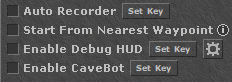
CaveBot options. The exact layout may vary between ZeroBot versions.
- Auto Recorder creates supported waypoints while you move and interact with the game. Configure the interval and waypoint type in Auto Recorder Settings, then review the generated route.
- Start From Nearest Waypoint selects the waypoint nearest to the character when CaveBot is enabled instead of always starting from the current list position.
- Enable Debug HUD draws CaveBot route information over the game. Its gear button contains filters such as Show Path and Show Lure Skipped Creatures.
- Enable CaveBot starts or stops CaveBot route execution.
The shortcut buttons in the options window add common actions to the waypoint list:
- Door, Hur Up, Hur Down, and Machete create their respective waypoint types.
- Sell Loot and Refill create a Node followed by a generated Script waypoint. Their item lists are configured through the options window's Settings button and are shared by ZeroBot instances through the CaveBot options configuration.
Generated Sell Loot and Refill scripts interact with NPCs and items, so their result depends on the target OTServer's NPC dialog and item IDs. Inspect the generated script and test it on that server.